Troubleshooting custom domains
When you’re setting up a custom domain on RevRoute, you might run into some issues. Here are some common ones:
Domain stuck in Pending status
If your domain stays in the Pending status for a long time, chances are the DNS records are misconfigured or haven’t propagated yet. You can check the expected configuration right in RevRoute: open Settings → Domains and expand the row of the Pending domain — a DNS configuration block will appear with the “A Record” and “CNAME Record (recommended)” tabs.
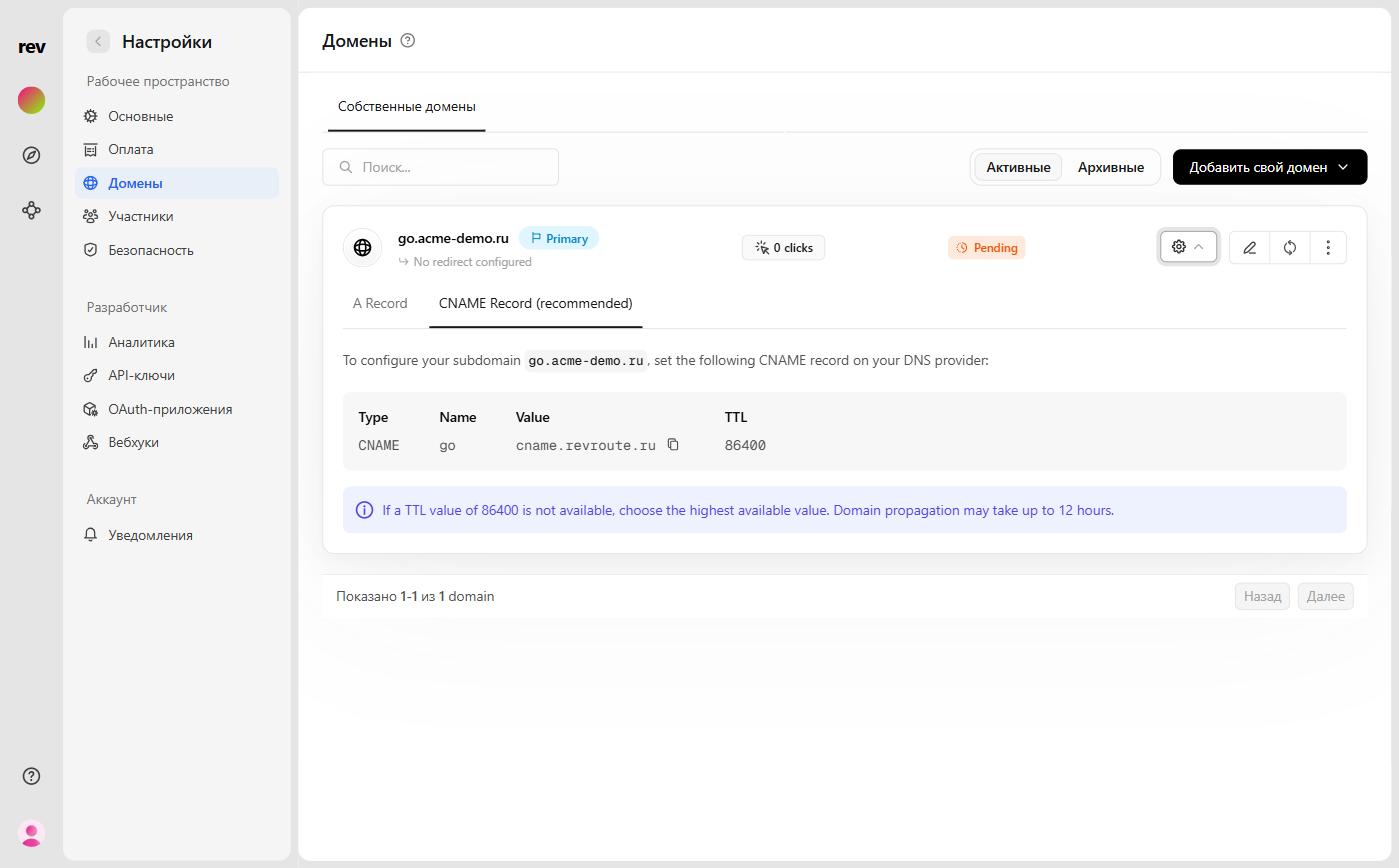
Make sure the record at your DNS provider matches the one shown in this block. For a subdomain, a CNAME record is recommended: Type — CNAME, Name — your subdomain (e.g. go), Value — cname.revroute.ru, TTL — 86400. For a root domain, use the “A Record” tab instead.
Once you’ve fixed the records, click the refresh button next to the domain row to re-check its status. Keep in mind that DNS changes don’t propagate instantly — depending on the TTL, it can take anywhere from a few minutes to a few hours.
domain.com redirected you too many times (ERR_TOO_MANY_REDIRECTS)
If you’re getting a domain.com redirected you too many times error in your browser, chances are you’re using Cloudflare for your domain hosting and are missing an extra configuration step to make this work.
To fix this, all you have to do is set your domain to use Cloudflare DNS only (without Cloudflare Proxy).
This site can’t provide a secure connection (ERR_SSL_PROTOCOL_ERROR)
Another common error is when the https version of your domain doesn’t work (but the http version does). When that happens, you’ll get a This site can’t provide a secure connection error in your browser.
The reason for this error is that the SSL certificate for your domain has not been generated yet, and it should automatically be resolved anywhere between 1 to 24 hours. If your domain still doesn’t work after 24 hours, please send us an email and we’ll be happy to help you out.