How to transfer domains between workspaces?
This guide is for transferring custom domains between RevRoute workspaces. If you
want to transfer links on the default RevRoute domain (link.revroute.ru)
between workspaces, please refer to the guide on how to transfer links
between workspaces.
Transferring domains between workspaces is a common use case for many RevRoute users. Some examples:
- You’re working with a client on a project and want to transfer the custom domains you’ve set up for them to their workspace
- You’re selling your custom link shortener and want to transfer the custom domain to the new owner’s workspace
This guide will show you how to transfer your RevRoute custom domains from one workspace to another – in just a few clicks!
When transferring a custom domain between workspaces, all links associated with the domain will also be transferred as well.
Transferring a domain will also fully reset the stats for the domain and its associated links and is irreversible – proceed with caution.
Step 1: Open the domain transfer modal
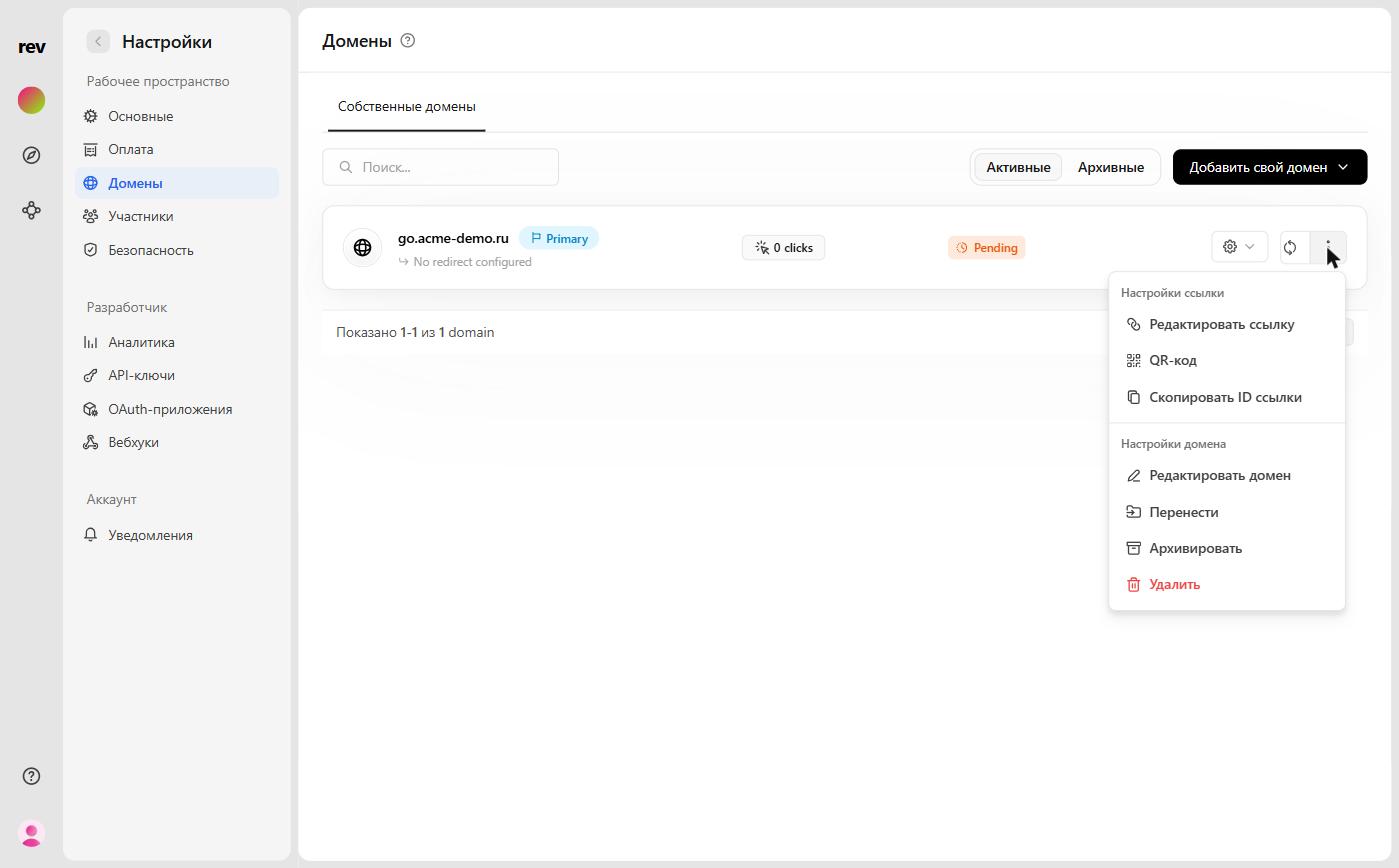
Go to Settings → Domains, click on the ⋮ button for a given domain and, under the domain settings section, select Transfer.
Step 2: Select the destination workspace
In the Transfer domain modal, use the Select workspace field to pick the workspace you want to transfer the domain to:

To confirm, type confirm transfer domain in the confirmation field and click Transfer domain.
That’s it! Your domain and its associated links should now be successfully transferred to the new workspace.
Transferring a domain will also fully reset the stats for the domain and its associated links and is irreversible – proceed with caution.
Caveats
- Transferring a domain will also fully reset the stats for the domain and its associated links and is irreversible – please proceed with caution.
- You cannot transfer a primary domain to another workspace. You’ll need to set another domain as primary before transferring the existing primary domain.
- Link tags are not transferred when you transfer a domain and its links between workspaces. You’ll need to re-apply the tags to the link in the new workspace.
- You can only transfer links to workspaces that you have access to. If you don’t have access to the destination workspace, you won’t be able to transfer the domain.