Эта функция доступна только на тарифных планах Business и выше .
С Revroute Partners вы можете создавать двусторонние стимулы для ваших партнерских/реферальных программ, которые предоставляют специальные скидки клиентам, зарегистрировавшимся по реферальной ссылке.
Некоторые примеры:
- Скидка 25% на первые 12 месяцев
- Пожизненная скидка 30%
- Разовая скидка 5000 ₽
Это может стимулировать мощный рост через «сарафанное радио», поскольку партнеры с большей вероятностью будут делиться своей ссылкой, если она дает их аудитории дополнительные скидки, а с другой стороны, их пользователи с большей вероятностью будут переходить по ссылкам, если получат специальное предложение.
В этой статье мы узнаем, как настроить двусторонние стимулы с Revroute Partners.
Для двусторонних стимулов вам нужна биллинговая система на вашей стороне, которая поддерживает купоны или промокоды. Revroute хранит идентификатор купона, созданного/зарегистрированного в вашей биллинговой системе, и передаёт его в ваш процесс оформления заказа — ваше приложение отвечает за применение этого купона при оплате.
Вариант 1: Скидки на основе ссылок (рекомендуется)
Этот вариант привязывает скидку к самой реферальной ссылке партнера. Клиенту не нужно вводить код — ваш чекаут автоматически применяет нужный купон в зависимости от того, какой партнер его привёл.
Скидки на основе ссылок обеспечивают лучшую точность атрибуции, так как вы получаете информацию о геолокации клиента, устройстве, данных реферера и UTM-параметрах.
Компромисс заключается в том, что для настройки требуется некоторая работа разработчиков.
Создайте скидку в Revroute
Сначала перейдите к группе партнеров, для которой вы хотите создать скидку. На вкладке Discount вы сможете создать скидку для группы
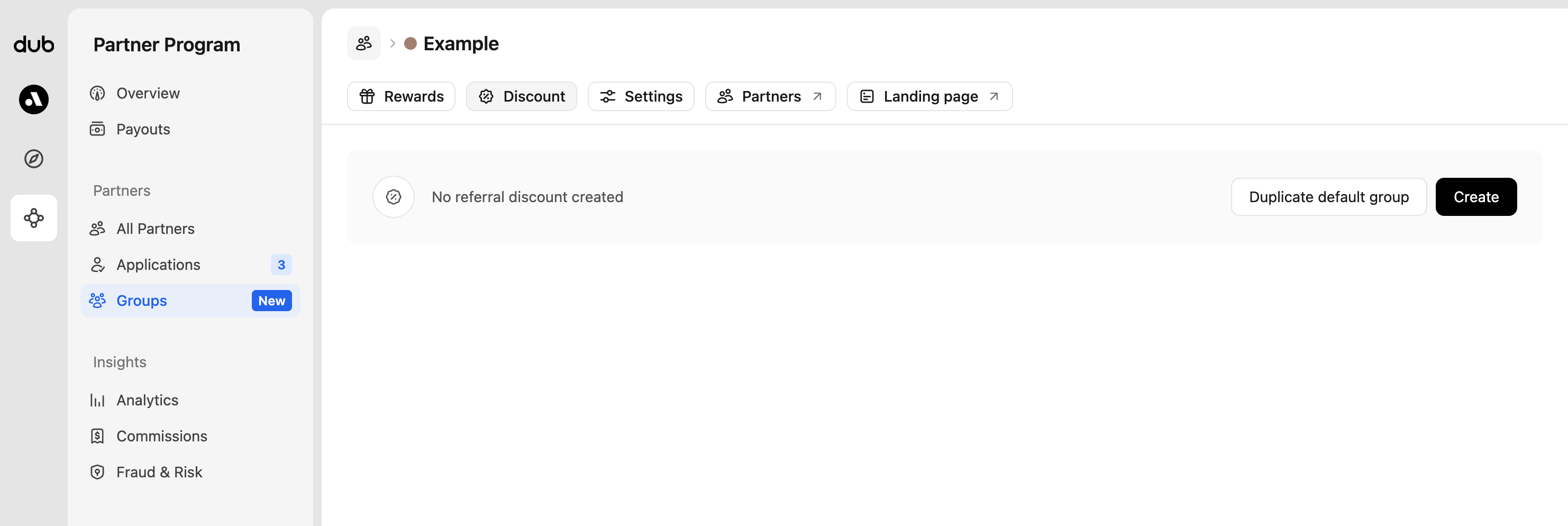
Если у вас уже настроена скидка для группы по умолчанию, вы можете просто продублировать её. Если нет, нажмите Create, чтобы создать первую скидку группы:

Новый купон
Если в вашей биллинговой системе ещё нет купона, вы можете использовать опцию New coupon, чтобы создать новый купон на основе типа скидки (процент или фиксированная сумма), суммы и длительности, установленных в Revroute.
Использовать ID существующего купона
Если у вас уже есть купон в биллинговой системе, вы можете ввести его ID (обычно 8-символьный буквенно-цифровой код) в поле Use existing coupon ID.
Большинство биллинговых систем не поддерживают обновление купонов после создания, поэтому если вы хотите изменить параметры скидки — придётся удалить её в Revroute и создать новую.
Примечание: Удаление скидки в Revroute не удаляет соответствующий купон в вашей биллинговой системе.
Добавьте логику купона в процесс оформления заказа
Ключ к реализации скидок на основе ссылок — проверка права клиента на скидку через Customers API от Revroute, а затем автоматическое применение соответствующего купона к сессии оформления заказа.
Вот как работает процесс:
- Когда пользователь нажимает на реферальную ссылку партнера, Revroute отслеживает его как потенциального клиента
- Во время оформления заказа вы запрашиваете Customers API от Revroute, используя ID пользователя
- Если клиент имеет право на скидку, вы применяете купон к сессии оформления заказа в вашей биллинговой системе
- Если нет, вы разрешаете ручной ввод промокодов
Пример ниже иллюстрирует логику с обобщённым клиентом биллинговой системы. Замените billing.checkout.create(...) на эквивалентный вызов в вашей биллинговой системе.
import { dub } from "@/lib/dub.ts";
import { billing } from "@/lib/billing.ts"; // клиент вашей биллинговой системы

// Get customer discount eligibility from Revroute
const customers = await dub.customers.list({
  externalId: userId, // their user ID within your app
  includeExpandedFields: true,
});

const customerDiscount = customers.length > 0 ? customers[0].discount : null;

// Create checkout session with conditional discount
const session = await billing.checkout.create({
  successUrl: "https://app.domain.com/upgraded",
  cancelUrl: "https://app.domain.com/pricing",
  lineItems: [
    {
      priceId: "price_xxx",
      quantity: 1,
    },
  ],
  mode: "subscription", // or "payment" for one-time purchases
  ...(customerDiscount
    ? {
        // Apply discount automatically if customer is eligible
        couponId:
          process.env.NODE_ENV !== "production" &&
          customerDiscount.couponTestId
            ? customerDiscount.couponTestId
            : customerDiscount.couponId,
      }
    : {
        // Allow manual promo code entry if no automatic discount
        allowPromotionCodes: true,
      }),
  customerEmail: userEmail,
  metadata: {
    userId,
    ...(customerDiscount && { dubDiscountId: customerDiscount.id }),
  },
});
После настройки подходящие клиенты автоматически увидят применённый промокод при оформлении заказа.
Вариант 2: Использование промокодов (без кода)
Если вы предпочитаете решение без кода, вы можете настроить скидки на основе промокодов для ваших партнеров.
Скидки на основе промокодов гораздо проще настроить (код не требуется).
Однако вы жертвуете точностью атрибуции, так как у вас не будет данных о геолокации клиента, устройстве, реферере и UTM-параметрах. Revroute попытается определить местоположение клиента на основе его платёжного адреса в вашей биллинговой системе, но это может быть неточным.
Создайте скидку в Revroute
Сначала перейдите к группе партнеров, для которой вы хотите создать скидку. На вкладке Discount вы сможете создать скидку для группы
Если у вас уже настроена скидка для группы по умолчанию, вы можете просто продублировать её. Если нет, нажмите Create, чтобы создать первую скидку группы:
Новый купон
Если в вашей биллинговой системе ещё нет купона, вы можете использовать опцию New coupon, чтобы создать новый купон на основе типа скидки (процент или фиксированная сумма), суммы и длительности, установленных в Revroute.
Использовать ID существующего купона
Если у вас уже есть купон в биллинговой системе, вы можете ввести его ID (обычно 8-символьный буквенно-цифровой код) в поле Use existing coupon ID.
Большинство биллинговых систем не поддерживают обновление купонов после создания, поэтому если вы хотите изменить параметры скидки — придётся удалить её в Revroute и создать новую.
Примечание: Удаление скидки в Revroute не удаляет соответствующий купон в вашей биллинговой системе.
Автоматическое создание кодов скидок
Когда включено, коды скидок будут автоматически созданы для всех существующих партнеров в этой группе и будущих партнеров при вступлении в эту группу.

Создайте код партнера
Откройте профиль партнера, для которого вы хотите создать код скидки, затем нажмите Create Code в разделе «Discount codes».
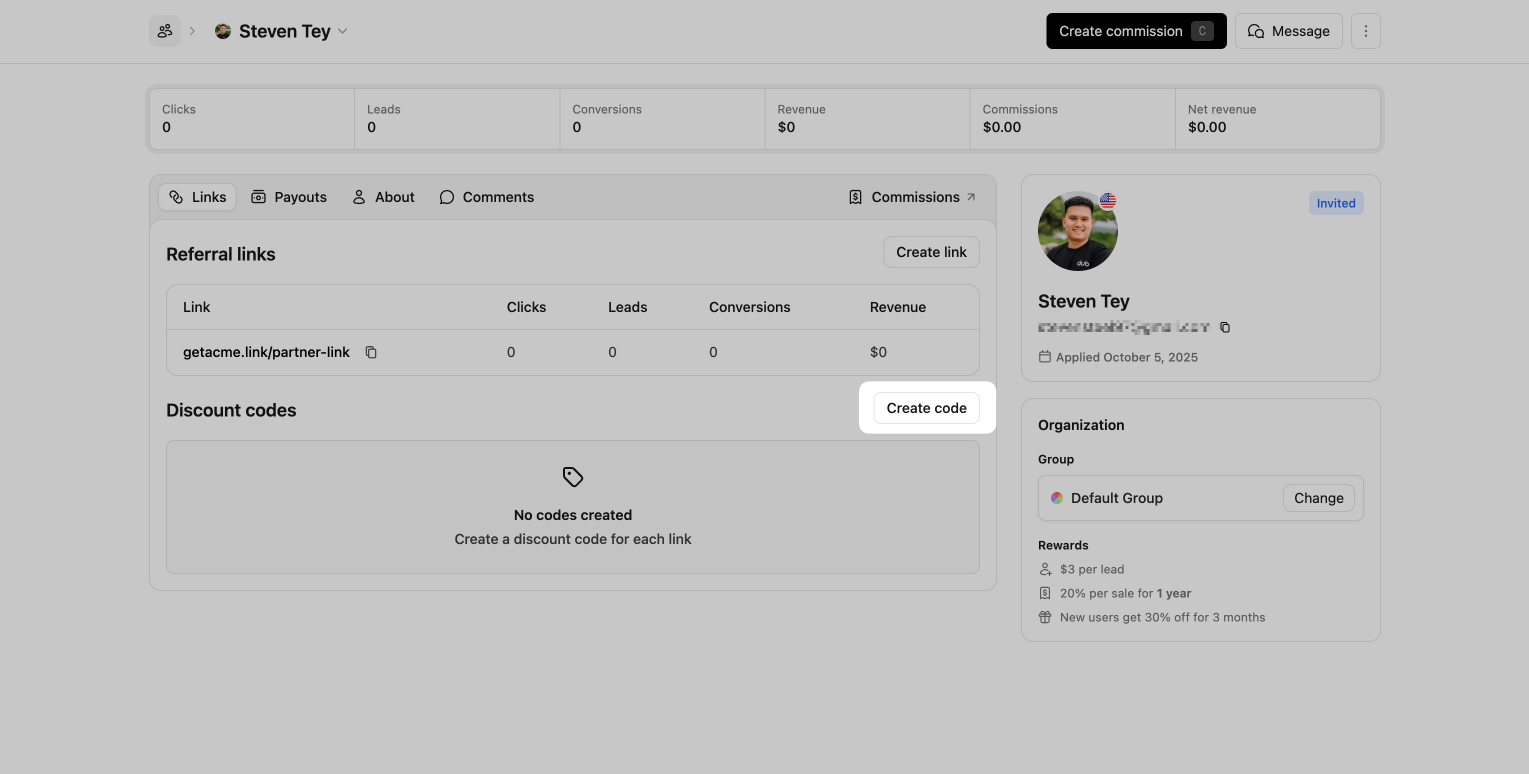
Здесь вы можете выбрать, с какой реферальной ссылкой связать код. Затем вы можете создать код скидки.
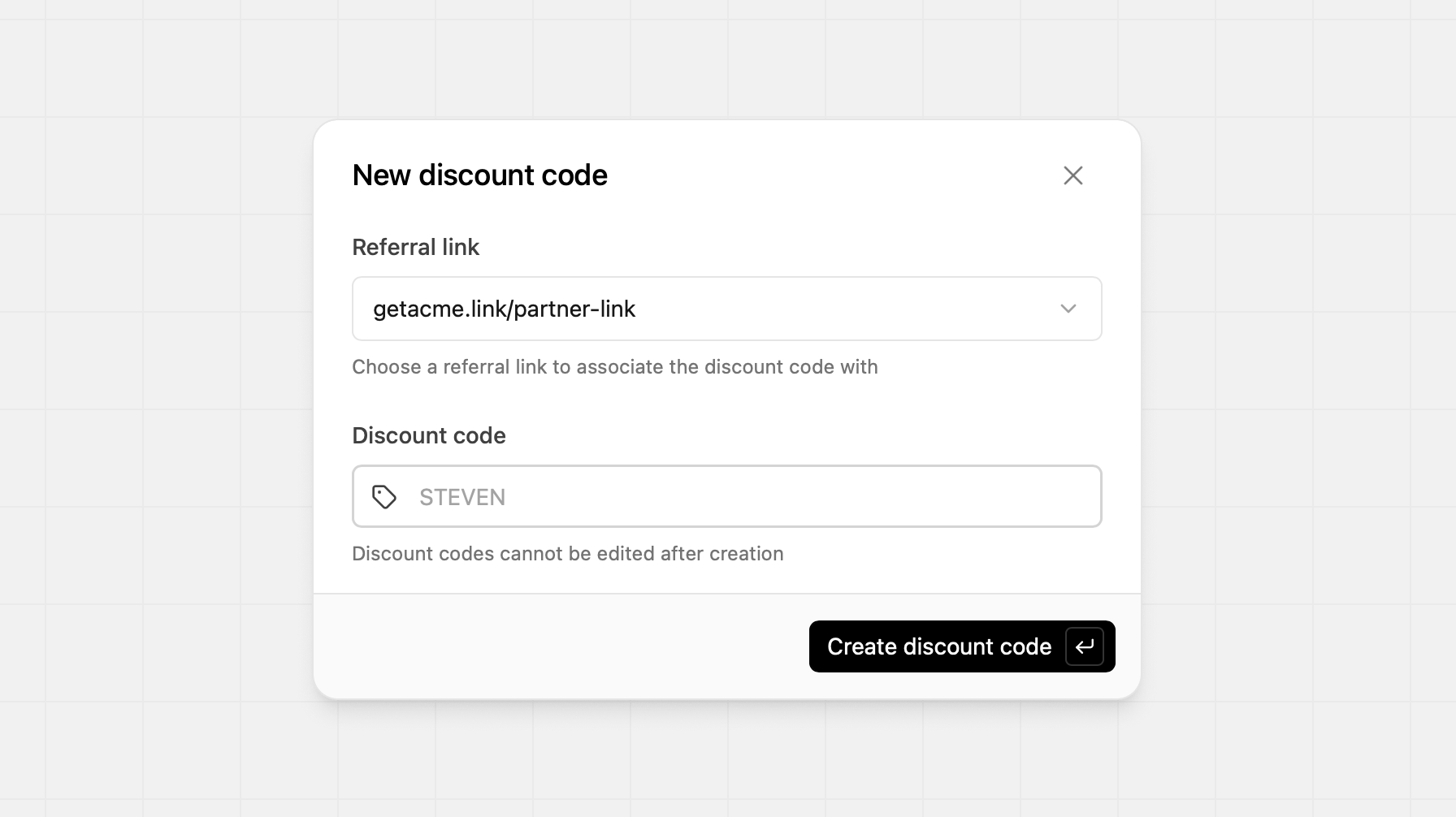
Коды скидок нельзя редактировать после создания, поэтому убедитесь, что все данные верны перед созданием кода
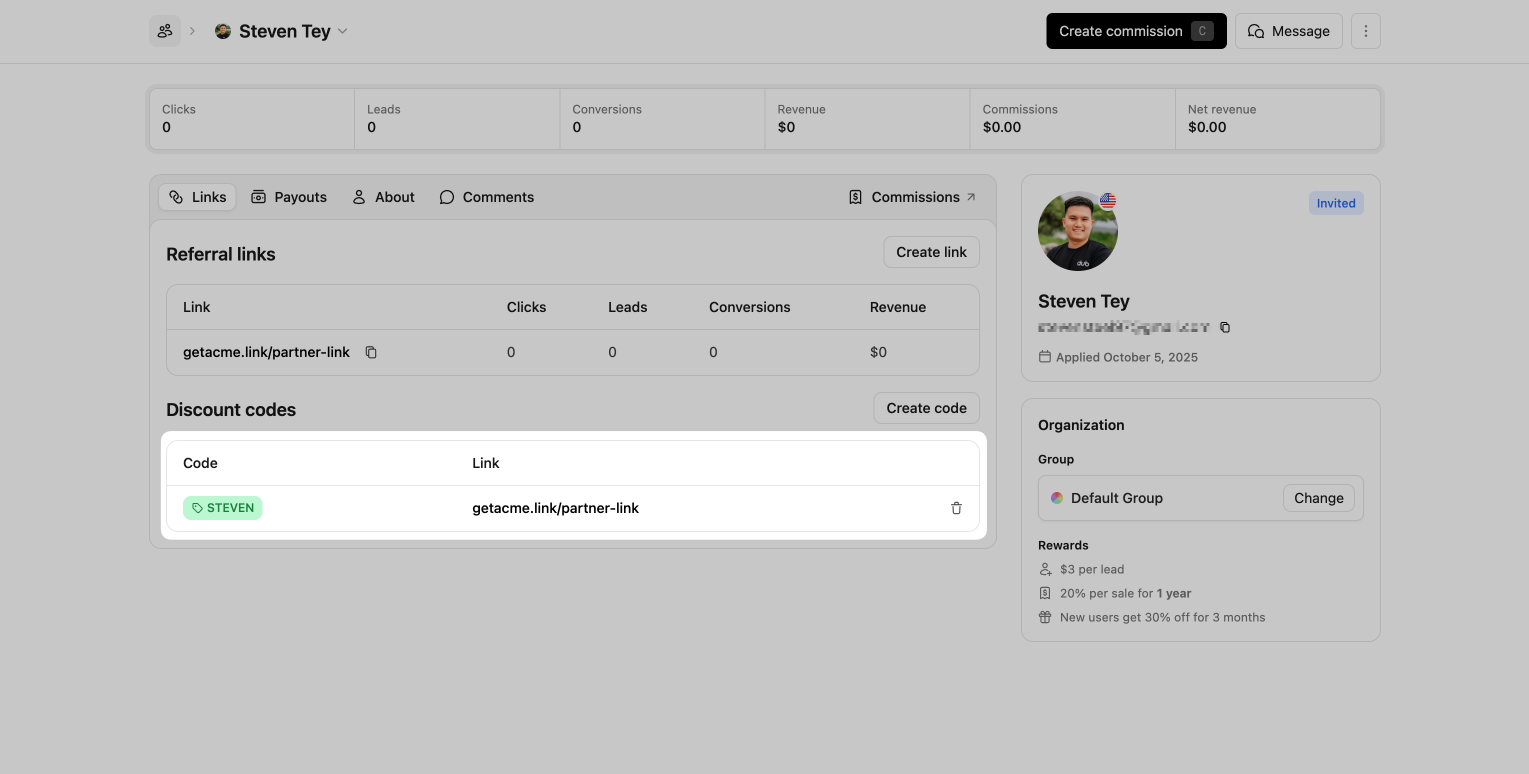
После создания кода его значение появится в разделе Discount Code, и он будет готов к использованию. В панели партнера они также увидят связанный код скидки в своих партнерских ссылках.
Отображение баннера скидки
После настройки двусторонних стимулов следующим шагом может быть отображение информации о скидке на вашей странице с ценами или главной странице.
Для этого вам нужно только установить скрипт Revroute Analytics с включенным отслеживанием кликов на стороне клиента — тогда, когда кто-то перейдет на ваш сайт по действительной реферальной ссылке, скрипт автоматически получит данные о партнере и скидке.
Данные партнёра и скидки скрипт складывает в cookie rr_partner_data —
JSON-объект такого вида:
{
  "clickId": "xxx",
  "partner": {
    "id": "pn_xxx",
    "name": "Иван Петров",
    "image": "https://example.com/ivan.png",
    "groupId": "grp_xxx",
    "tenantId": null
  },
  "discount": {
    "id": "disc_xxx",
    "amount": 25,
    "type": "percentage",
    "maxDuration": 3,
    "couponId": "XZuejd0Q",
    "couponTestId": "2NMXz81x"
  }
}
type — либо percentage (процент), либо flat (фиксированная сумма);
maxDuration — сколько месяцев действует скидка (null — бессрочно).
В коде страницы те же данные доступны в объекте window.RevRouteAnalytics.
Читать их надо внутри колбэка ready: к этому моменту скрипт уже сходил за
данными клика.
<script>
  revRouteAnalytics("ready", function () {
    const { partner, discount } = window.RevRouteAnalytics;
    if (!partner || !discount) return;

    const banner = document.createElement("div");
    banner.innerHTML = `
      <img src="${partner.image}" alt="${decodeURIComponent(partner.name)}" />
      <p>
        ${decodeURIComponent(partner.name)} рекомендует вам Acme
        и дарит скидку ${discount.amount}${discount.type === "percentage" ? "%" : " ₽"}
      </p>
    `;
    document.body.appendChild(banner);
  });
</script>partner.name и partner.image хранятся в cookie в URL-кодировке — перед
выводом их нужно пропустить через decodeURIComponent.